

macOS app · Available now
See where your Mac hours actually go.
SessionMark is an automatic time tracking app for macOS that silently logs every app, website, and work session on your Mac, so you can understand your habits, spot distractions, and review how your day was really spent. A private alternative to Screen Time, built for freelancers, developers, and makers.
Built for freelancers, makers, and Mac users who want more detail than Screen Time can provide.
macOS
Signed & notarized DMG
Local-first · No subscription
Why SessionMark
Understand your day, not just your screen time.
Mac users already have Screen Time, but it only tells part of the story. SessionMark gives you a more useful view of your day by automatically capturing what you were doing across apps, websites, and sessions, then organising it into a timeline you can actually review.
Whether you are doing client work, writing, coding, researching, or accidentally spending too long on YouTube, SessionMark helps you see where your time went.
- No timers to start, it runs quietly in the background
- Organised into categories that make sense
- Drill into specific apps, sites, and sessions
- Built for reflection, not for billing
"SessionMark sits between basic screen usage stats and traditional time tracking software. Detailed enough for professionals, simple enough for anyone who wants a clearer picture of their digital habits."
Built by Polyphasic DevelopersSee it in action
A daily view you can understand at a glance.
Real screenshots from the app, this is exactly what you see when you open SessionMark.
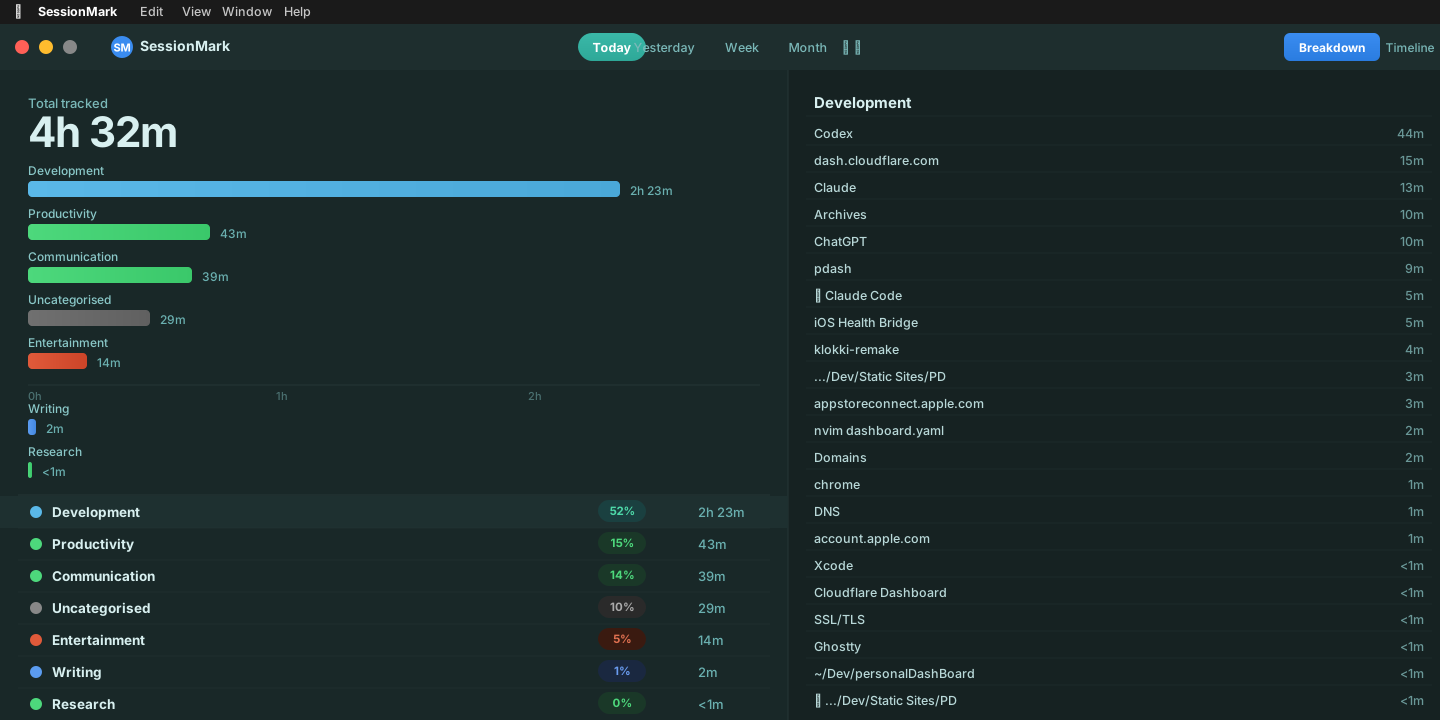
Dashboard
See your full day, broken down by category.
The Breakdown view shows your total tracked time split across categories like Development, Productivity, Communication, Entertainment, and Writing, with percentage badges and per-category totals.
Click any category on the right to drill into every app, website, and document that contributed to it. The source list updates instantly.
- Total tracked time shown prominently at the top
- Proportional bar chart makes the distribution obvious
- Per-source detail on the right, apps, sites, and files listed individually
- Switch between Today, Yesterday, Week, or Month at the top
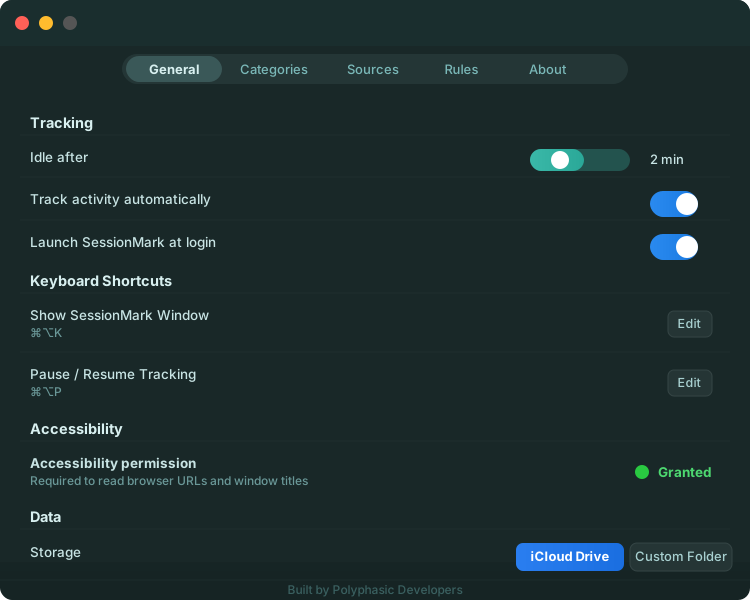
Settings
Stay in control of how it works.
SessionMark gives you straightforward control over tracking behaviour, storage location, and keyboard shortcuts, without burying settings in endless menus.
Accessibility permission is required to read browser URLs and window titles. It's the same permission other activity trackers use, and macOS shows you exactly when it's in use.
- Idle detection with configurable timeout
- Toggle automatic tracking or pause it with a keyboard shortcut
- iCloud Drive by default, switch to a Custom Folder any time
- Categories, Sources, and Rules tabs for organising your data
Core features
What SessionMark helps you do.
Six capabilities that work together to give you a clearer picture of how your Mac time is actually spent.
Automatic activity tracking
Capture your day across apps, websites, and sessions without manual timers. SessionMark runs quietly while you work.
Category breakdowns
Group your time into useful buckets, development, writing, communication, research, entertainment, so patterns are easy to spot.
Detailed session review
Inspect what happened during the day. See exactly which apps, sites, and sessions contributed to your time, down to the minute.
Local-first data
Your data stays under your control. iCloud Drive is the default storage location, with custom folder support available in Settings.
Rules and organisation
Shape how activity is categorised so SessionMark becomes more useful over time. It learns to reflect how you actually work.
Lightweight exports
Use your data for reflection, reporting, or personal review without turning the app into accounting software. Data is yours to use.
Who it's for
Made for people who want clarity.
SessionMark is useful whether you track time for clients or just want to understand your own habits better.
Freelancers
Client and admin time, made visible.
See exactly where your billable and non-billable time goes. Understand how much of your day is real work versus context switching and admin drift.
Makers & indie developers
Protect focus. Reduce drift.
See what's quietly eating into your deep work time. Spot the distractions before they become habits. Build with more intention.
Students & researchers
See how your time is really being spent.
Understand how much of your study session was actually studying. Review your day honestly and adjust before the pattern repeats.
Everyday Mac users
A better alternative to Screen Time.
If you've ever wondered where your afternoon disappeared, SessionMark gives you a clearer, more actionable answer than Apple's built-in tool.
How it compares
More useful than Screen Time. Less rigid than timesheets.
SessionMark sits between basic screen usage stats and traditional time tracking software. Detailed enough for freelancers and professionals, but simple enough for anyone who wants a clearer picture of their digital habits.
Screen Time
SessionMark
Time trackers
Use cases
Use SessionMark to answer questions like:
- Where did my workday actually go?
- How much time did I spend doing real work versus context switching?
- Which apps or websites quietly consumed more time than I expected?
- How much of my day went to communication, development, research, or writing?
- What keeps interrupting my focus?
Privacy & storage
Your time data should stay yours.
SessionMark is built with a local-first approach. By default, your data is stored in iCloud Drive → SessionMark, giving you secure, familiar Apple infrastructure without extra setup. Prefer another location? Switch to a custom folder in Settings.
There are no accounts to create, no cloud service to sign up for, and no data leaving your machine. What you track stays with you.
Local-first design
iCloud Drive by default
Custom storage folder support
No accounts, no cloud sign-up
Clear control from Settings
FAQ
Common questions.
What is SessionMark?
SessionMark is an automatic time tracking app for macOS that helps you understand how your time is spent across apps, websites, and work sessions, without needing to start or stop any timers.
Why isn't SessionMark on the Mac App Store?
Automatic activity tracking requires system-level access that Apple's App Store sandbox restrictions do not permit. This is the same reason apps like Klokki (a similar app, now unsupported) were not available on the Store. SessionMark is distributed as a signed, notarised DMG directly from this page, it is safe to install and verified by Apple's notarisation process.
Is SessionMark only for freelancers?
Not at all. It is useful for freelancers, makers, students, and anyone who wants more insight into their Mac activity. If you have ever wondered where your afternoon went, SessionMark is for you.
Is this a billing or invoicing app?
Not primarily. SessionMark is built first as a clarity and review tool. Reporting and exports are secondary features, the primary goal is understanding your time, not turning it into an invoice.
Where is my data stored?
By default, SessionMark stores data in iCloud Drive → SessionMark. You can change this in Settings and choose a custom folder on your Mac. No data leaves your machine to any third-party service.
Is SessionMark a replacement for Screen Time?
Think of it as a more detailed companion. Screen Time shows you totals, SessionMark shows you sessions, patterns, and context. You can use both, but SessionMark is designed for people who want to dig deeper into how their time is actually distributed.
Download
Get a clearer picture of your day.
SessionMark helps you understand how your Mac time is really spent so you can work with more intention, reduce wasted time, and build better habits.
Signed & notarised by Apple