Vendor onboarding automation: stop chasing forms and approvals
A new vendor arrives as a request in email. By the time finance can use the record, several people have chased documents, checked the same details and asked where the approval went.
Published 17 August 20267 minute readOperations Automation
A department needs a new supplier. Someone emails finance with a company name and a contact. Finance replies with a form. The supplier returns most of it, but the insurance certificate is old and the tax details sit in a separate attachment.
Operations approves the commercial need in chat. Finance checks the payment information. Someone types the same details into an ERP, a procurement system and a spreadsheet used to track annual reviews.
Nothing here is especially difficult. That is why the process survives. Each small task looks tolerable while the whole route remains slow, hard to see and surprisingly dependent on chasing.
Vendor onboarding automation can remove the repeated collection, checking and re-entry. It should not automate the trust decisions hidden inside the process.
Vendor onboarding is more than filling in a form
A vendor record is useful only when the business knows who requested it, what has been checked and who approved it. The route usually includes:
collecting company, contact, tax and payment information;
requesting documents required by the business or industry;
checking required fields, expiry dates and duplicate records;
routing commercial, finance or risk approval;
creating the approved vendor in the systems that need it;
keeping the evidence and setting future review dates.
The exact checks vary. A small office supplier should not need the same route as a contractor entering a customer site. Trouble starts when every vendor follows an improvised version of the process and nobody can say which checks apply.
Where the manual cost hides
The data entry is visible. The interruptions are not.
Procurement asks whether finance has reviewed the bank details. Finance searches an inbox for the latest attachment. The requester cannot see that the supplier has not returned one document, so they ask for an update. A vendor sends a corrected form and nobody is certain which copy became the source of truth.
The process can also delay real work. A team may be ready to place an order while the vendor record is still waiting for one approval. The delay rarely appears against the onboarding process itself, but the operation feels it.
Measure several completed onboardings before changing anything. Include one that went smoothly, one with missing information and one that required a changed document. Record hands-on time, waiting time, repeated requests and every place the same data was entered.
Start with one secure intake
Email is a poor place to collect sensitive vendor information. Attachments get forwarded, duplicated and left in inboxes long after the record is complete.
A better intake asks only for the information required for that vendor type. It gives the supplier or internal requester a clear list of missing items and keeps each submission against one record.
Security matters here. Payment details, tax forms and identity documents should not be copied into logs or exposed to every person who can view the workflow. Access should follow the job. A requester may need to see status without seeing bank information.
Do not turn the form into a questionnaire for every possible department. Conditional fields are useful when the rules are clear. Otherwise, split the route by vendor type and keep the common path short.
Validate before asking a person to review
Software can check whether required fields are present, dates use the expected format and documents have expired. It can compare tax identifiers or company names with existing records to flag likely duplicates. It can also confirm that an account number has the right shape for the country supplied.
Those checks reduce clerical work. They do not prove that the information is genuine.
A valid-looking bank account can still belong to the wrong party. A current certificate can be irrelevant to the work being commissioned. Keep validation separate from verification so nobody mistakes a passed format check for approval.
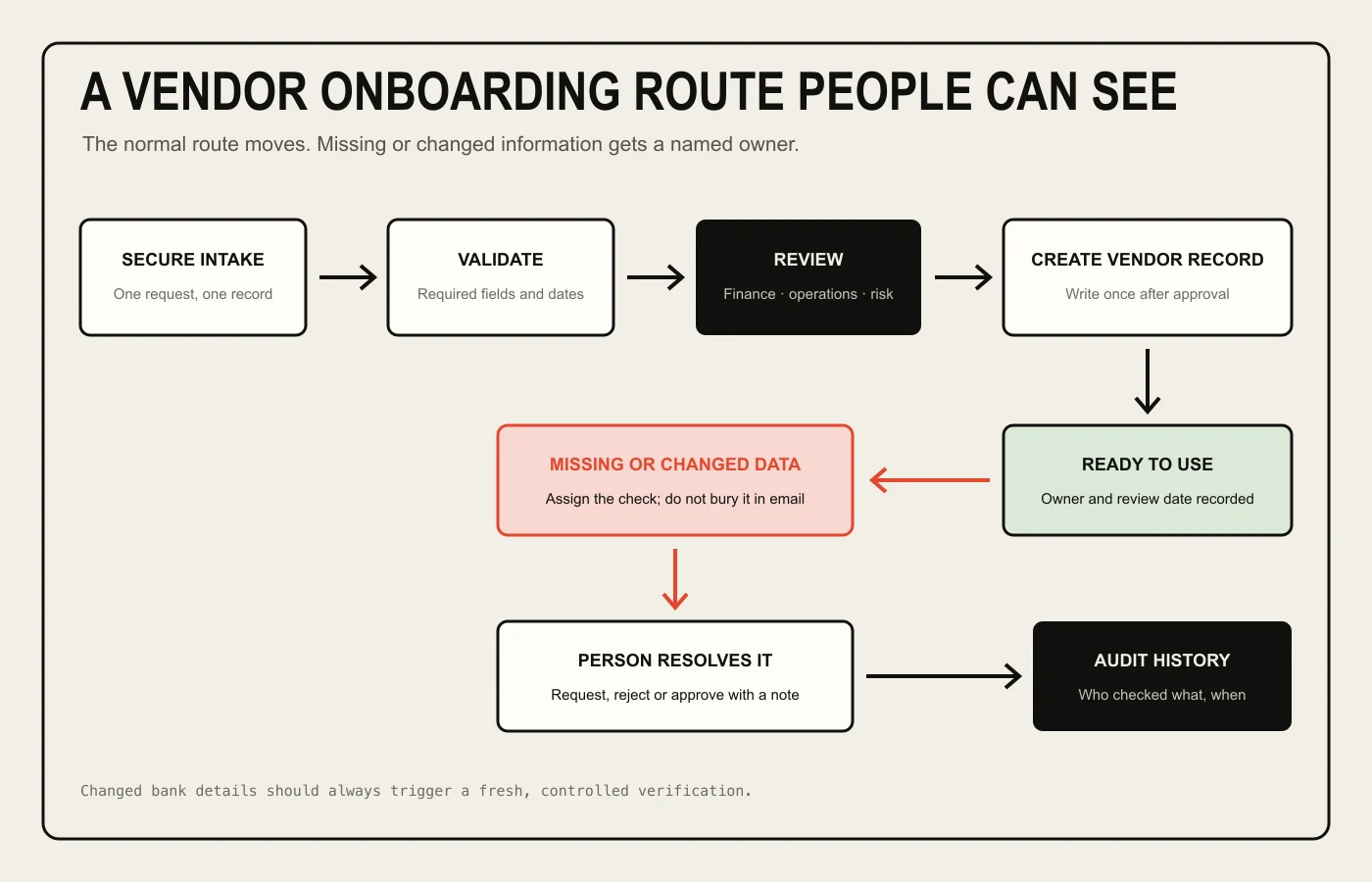
The normal route should move without chasing. Missing or changed information needs a named owner and a recorded decision.
Make approvals explicit
An approval buried in chat or an email thread is hard to find later. The workflow should show who approved which version of the information and when.
Route decisions by the risk involved, not by habit. Operations may confirm that the vendor is needed. Finance may verify payment details and tax information. A risk or compliance owner may review insurance, contracts or security documents where those checks apply.
Not every vendor needs every approver. A route that sends low-risk purchases through six people will be bypassed, usually with good reason. Define thresholds and categories the team can explain without consulting a flowchart drawn three years ago.
Approvers should see the source information, the checks already completed and the precise decision they are being asked to make. A button labelled "approve" is not helpful if nobody knows whether it approves the commercial need, the bank account or the whole vendor relationship.
Treat changed payment details as a new event
A change to bank details should never slide through as a routine profile edit.
The system should preserve the previous value, record who requested the change and start the agreed verification route again. It should not trust an email because the sender's name looks familiar. The person making the change also should not be the only person approving it where the business requires separation of duties.
Automation helps by making the check unavoidable and keeping the evidence together. A person still owns the verification. This is not the place for a model to judge whether an email "seems legitimate".
Write to business systems only after approval
Once the vendor is approved, software can create or update records in the ERP, procurement platform or other systems. Writing the same information once reduces typing errors and prevents several slightly different vendor records from appearing.
Decide which system owns each field. If finance owns payment terms, another system should not quietly overwrite them during a later sync. Keep the original submission and approval history even when the final record lives elsewhere.
Integrations also need a failure route. If the ERP rejects a record because a code is missing, show the error against the onboarding item and assign it. Do not leave an approved vendor stuck between systems while the workflow reports success.
Where AI may help
Most of this process needs forms, rules and integrations rather than AI.
A model may help extract fields from a document that arrives in an inconsistent layout. It may classify an uploaded file or suggest that two company names refer to the same business. Those results should remain suggestions until checked against the source.
AI should not approve a supplier, verify changed bank details or decide that a missing document is probably fine. Those decisions carry commercial and security consequences. Predictable rules and named people are less exciting, which is a decent quality in a control process.
A sensible first version
Choose one vendor category with enough volume to observe and a reasonably stable approval route. Map the current process from request to usable system record.
A useful first version might provide secure intake, required-field checks, a visible approval queue and one integration to the main vendor system. Run it alongside the current process for a short period without allowing it to create production records automatically.
Check every route. Use complete submissions, missing documents, duplicate vendors, expired certificates, rejected approvals and an integration failure. Pay particular attention to resubmissions: the reviewer must be able to see what changed rather than rereading the whole file and hoping to spot it.
Only automate record creation after the team trusts the checks and ownership. Keep unusual cases with people.
When custom software is the wrong answer
Check the products already in place first.
Many procurement, accounting and ERP platforms include supplier portals, approval workflows or vendor management modules. If one of those handles the route without ugly workarounds, use it. A standard form and a shared checklist may be enough for a business onboarding a handful of low-risk vendors each month.
Custom software is also premature when nobody agrees on the approval policy. Code will make a confused process faster at being confused. Set the rules and ownership first.
The stronger case appears when vendor onboarding is frequent, the route spans systems that do not connect cleanly and staff repeatedly chase the same missing items. There should be a specific operational cost or control problem to remove. Otherwise, you are buying a custom portal because email is irritating, which is not much of a business case.
Questions to answer before speaking to a developer
Which vendor types follow different routes?
What information is genuinely required before approval?
Who owns each decision, and what are they approving?
Which checks can be deterministic and which require judgement?
Where is sensitive information allowed to be stored and viewed?
Which system should own the final vendor record?
What must happen when documents expire or payment details change?
Bring a few completed examples with sensitive information removed. Include the email chase and the rejected cases, not only the clean form. That is where the actual workflow lives.
Good vendor onboarding automation does not remove scrutiny. It stops people spending their time finding the document, locating the approver and typing the approved answer into another box.
Still chasing vendor forms?
Start with one vendor type and the checks that keep going missing.
Polyphasic Developers builds practical workflow software and integrations for businesses with expensive manual processes. Bring the current route and we will tell you whether custom software is sensible.