
Journal › Operations Automation
Automate manual order entry without replacing your ERP
The ERP is often doing its job. The expensive part is everything people do before an order reaches it.
The ERP is often doing its job. The expensive part is everything people do before an order reaches it.
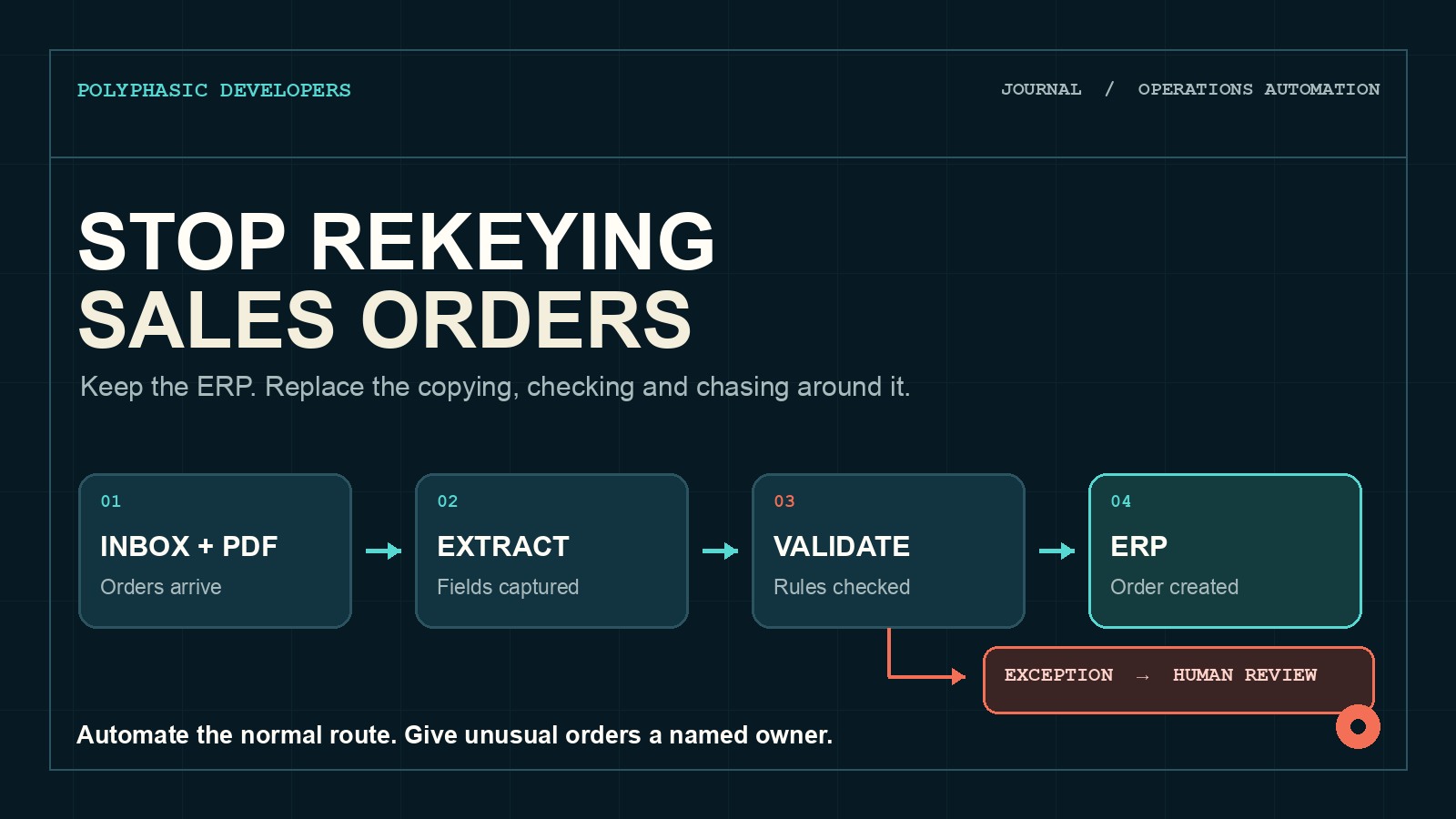
A customer emails a purchase order. Someone opens the PDF, finds the customer record, checks the delivery address and types each line into the ERP. The product code on the order does not quite match the code in the system, so they search an old order to see what happened last time.
Another order arrives as a spreadsheet. A third is written in the email itself. One has an agreed price that the ERP does not recognise. By lunchtime, the order entry team has spent hours copying information and several people are waiting to know whether anything is wrong.
This is a good automation candidate because the normal route is repetitive and the exceptions are valuable. The aim is not to remove people from order management. It is to stop using them as a connection between an inbox and an ERP.
Calling this data entry understates the work. A person entering an order may also be:
The typing is easy to see. The judgement around it is where the process becomes expensive. If that judgement lives in experienced people's heads, a new system cannot safely replace it by pretending every order is standard.
Before buying software, follow a useful sample of orders from arrival to a confirmed ERP record. Include straightforward orders, repeat customers, changed addresses, unknown product codes, price differences and cancellations.
Record hands-on time, waiting time and every handoff. Count how often staff return to the source document, ask another person for an answer or correct an order after entry. Separate errors caught before fulfilment from errors found by a warehouse or customer later.
Do not start by estimating how many seconds automation saves per line. That produces a very tidy business case for the least important part of the problem. Delayed orders, avoidable corrections and work that only one experienced employee can complete usually matter more.
Automation needs a route it can explain. Start with one order type, one business unit or a group of customers whose orders follow similar rules.
A normal order might have a recognised customer, known delivery location, valid product codes, agreed pricing and quantities within expected limits. It can move through extraction and deterministic checks without somebody approving every field.
Anything outside those conditions becomes an exception. The software should say which rule failed and assign the order to the person who can resolve it. A queue labelled "needs review" is not enough if every reviewer still has to reconstruct the problem from the original email.
Orders arrive in awkward formats. Some customers use a consistent template. Others produce PDFs from different systems, attach spreadsheets or put the useful information in an email body.
Document extraction can turn those sources into candidate fields: purchase order number, requested delivery date, product reference, quantity and price. Template rules may handle stable documents. A model can help with variable layouts.
Extraction is not approval. Keep the original document with the proposed order and retain a confidence or validation result for each important field. The system should reject or route uncertain values rather than filling a gap with a plausible answer. Plausible is not a useful property for a shipping address.
Most order checks do not need AI. Customer numbers, product codes, price agreements, credit holds, quantity limits and duplicate purchase order numbers are structured facts. Check them against the systems that own them.
AI can be useful where the source is inconsistent. It may identify that "blue widget large" probably maps to a known SKU, or classify a note as a delivery instruction. That suggestion should still pass an explicit rule or go to a person when the consequence matters.
Do not ask a model to invent a missing SKU, waive a price difference or infer that a customer probably meant the usual address. Those are commercial decisions wearing the clothes of clerical work.
The exception queue is the product. The straight-through route should need little attention, so the working experience is defined by what happens when an order does not fit.
Each exception should show the source, the extracted value, the system value and the reason for the mismatch. It should name an owner and record the decision. If the same exception keeps appearing, the team should be able to see that pattern and fix the rule, customer setup or product mapping behind it.
Keep different decisions separate. Sales may own an unrecognised price. Finance may own a credit hold. Operations may own an impossible delivery date. Sending all three to a general order entry queue preserves the bottleneck with nicer colours.
The ERP remains the system of record. The automation should prepare a valid order, send it through a supported API or integration method and confirm what the ERP actually created.
Plan for partial failures. An ERP may accept the order header and reject a line, time out after creating a record or return a reference that never reaches the workflow. Use idempotency controls where the integration supports them, and check for an existing purchase order number before trying again. Duplicate orders are a poor way to discover that a retry button works.
Keep an audit trail from the source document to the final record. A future reviewer should be able to see what was extracted, which checks ran, who resolved exceptions and which ERP identifier was returned.
Choose a narrow, frequent route with enough volume to measure. Build the intake, extraction, validations and review queue first. For the initial run, let the system prepare the ERP payload without creating the production order.
Compare the proposed record with what an experienced operator enters. Test clean orders and deliberately awkward ones. Include duplicate purchase order numbers, unknown SKUs, outdated prices, changed delivery addresses, unreadable scans and an ERP outage.
Once the team trusts the normal route and the exception information, allow a controlled group of orders to write automatically. Keep a quick way to stop the integration without losing the queue.
Check the software you already own. Many ERP, ecommerce, EDI and order management products include customer portals, import tools or document capture. If customers will use a portal and the built-in workflow covers the exceptions, use it.
Electronic data interchange may be the better answer for a few large customers sending high volumes in a stable format. A standard CSV import may be enough when orders are already clean and somebody only needs to move a file once a day.
Custom software is premature if pricing rules are inconsistent, product data is unreliable or nobody owns exception decisions. Code will expose those problems, not settle them.
The case becomes stronger when order volume is meaningful, the same checks happen repeatedly and the current route crosses systems that do not connect cleanly. There should be a measurable operational problem to remove, not just a general dislike of copying and pasting.
Bring real examples with customer details removed. Include the strange ones and the corrections. The perfect order shows the happy path. The awkward order shows what the software actually has to do.
Good order entry automation does not make every order look normal. It lets normal orders move quietly and gives the unusual ones to the right person with the problem already explained.
Polyphasic Developers builds practical workflow software and integrations for businesses with expensive manual processes. Bring the current route and we will tell you whether custom software is sensible.