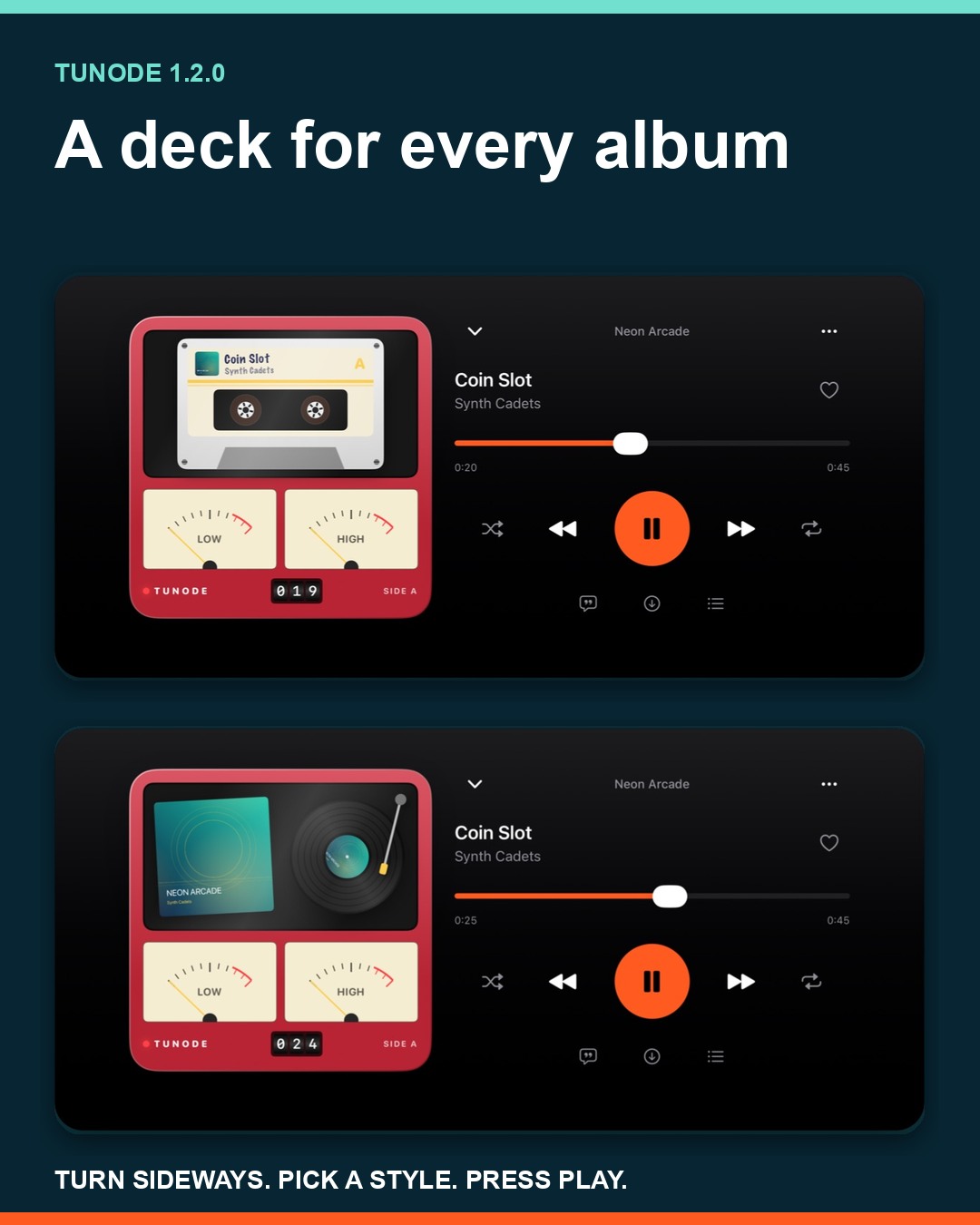
Release summary: Turn your iPhone or iPad sideways in Now Playing and the album artwork becomes a cassette or record. Tunode 1.2.0 adds moving reels, a tape counter and level meters, along with an iPhone Duo layout and tidier album grids and toolbars.
The new deck is deliberately a bit unnecessary. Music does not sound better because a pair of reels winds across the screen. It does, however, make Now Playing more pleasant to leave open on a desk, stand or folded phone.
The visual part takes its cue from the track: the reels wind, the counter changes and the level meters move with the music rather than sitting there like a photograph of an old stereo.
Turn sideways to open the new deck
Start playing a track, open Now Playing and rotate your iPhone or iPad sideways. The artwork becomes a deck, with a cassette or record style available.
The artwork can become a cassette or a record. This is not a separate player to configure before you can listen. It is a sideways treatment for the Now Playing screen, so the route is simply: play something, open Now Playing and turn the device.
The deck appears when the device is sideways. Turn it back when you have finished looking at the cassette or record treatment.
Tap the deck to change its style
Tap the deck itself to change the style. That is the whole switch: there is no separate style menu to find before choosing the cassette or record treatment.
Both styles turn the album artwork into part of the deck. Pick the one that suits the album, then tap again when the next record deserves a different bit of machinery.
If you would rather keep Now Playing plain, open Tunode's Settings and switch the deck off. The feature is there for people who enjoy it, not as a compulsory tour of hi-fi nostalgia every time the phone rotates.
Watch the deck move with the track
The reels wind as the track plays. A tape counter advances and the level meters move with the music. Those details make the deck behave like part of Now Playing rather than a fixed frame around the album cover.
You do not need to operate the counter or meters. They respond while the track plays. Think of the deck as the album artwork getting a sideways mode with rather more character.
Use Tunode across every iPhone Duo pose
Tunode 1.2.0 also adapts to every iPhone Duo pose. Partly fold the phone and the deck takes one side of the fold while the controls take the other.
That split keeps the crease from cutting through one large interface. One surface becomes the display for the cassette or record; the other remains the place for controlling playback.
The update also tidies album grids and toolbars for the new displays. There is no separate layout switch to find: Tunode changes its arrangement as the device pose changes.
How to update Tunode
- Open Tunode on the App Store.
- Choose Update if it appears. If the page says Open, the current version may already be installed.
- Play a track, open Now Playing and rotate your iPhone or iPad sideways.
- Tap the deck to change its style, or open Settings if you want to switch it off.
Tunode 1.2.0 follows version 1.1.5, which fixed a crash around album details and Downloads and improved offline queues. New to the app? Explore Tunode or use the Navidrome connection guide to get started.
Tunode 1.2.0 questions
What changed in Tunode 1.2.0?
Now Playing gains a sideways cassette or record deck with moving reels, a tape counter and level meters. Tunode also adapts to every iPhone Duo pose and has tidier album grids and toolbars for the new displays.
Can I turn the deck off?
Yes. Open Settings in Tunode and switch the deck off if you prefer the usual Now Playing view when the device is sideways.
Where can I get Tunode 1.2.0?
Get the update from the App Store. Automatic updates may already have installed it.