What is AI workflow automation for a small business?
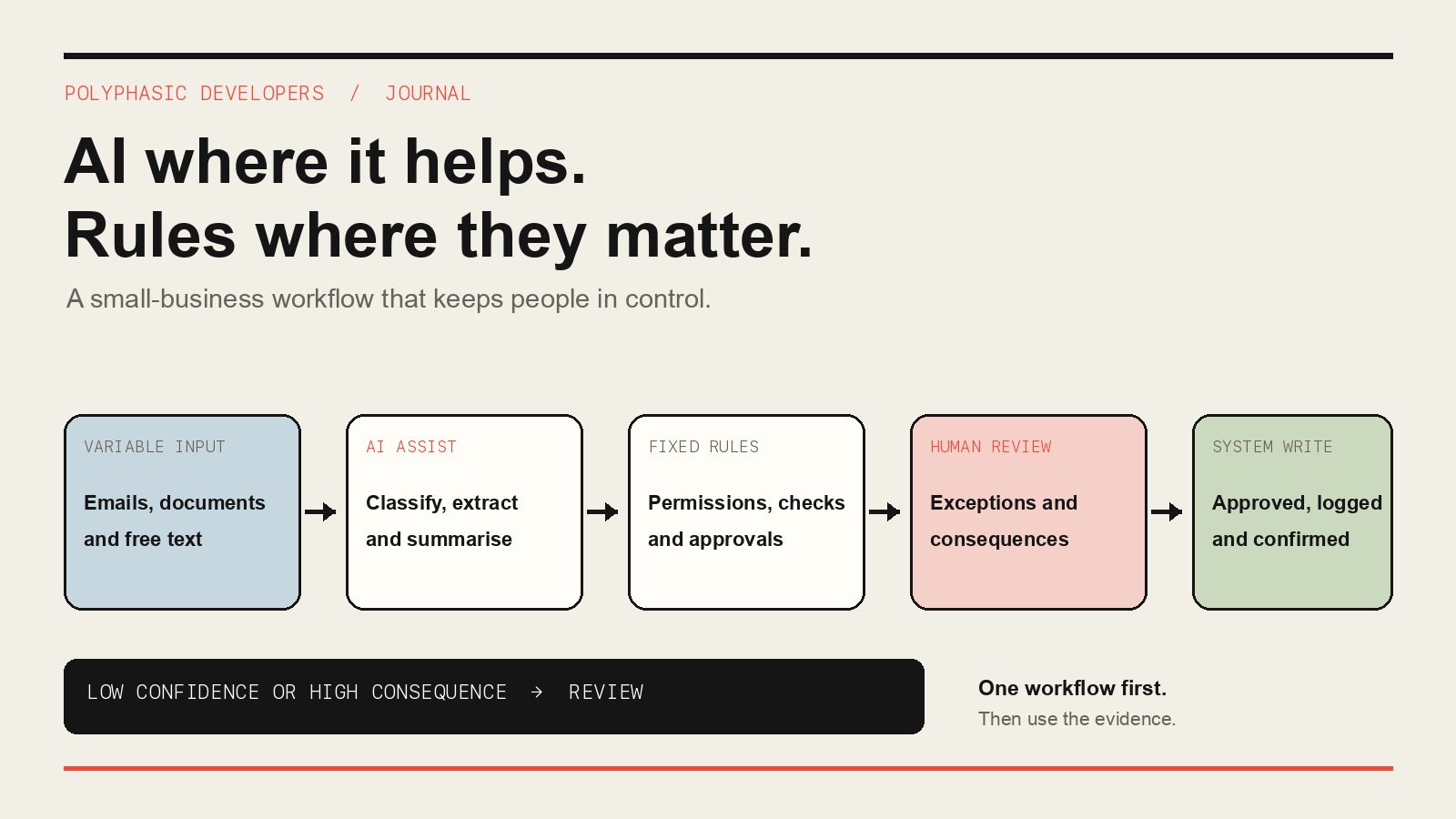
Workflow automation moves a job through repeatable steps without requiring somebody to copy, forward or retype every item. Conventional automation follows fixed conditions: if an invoice has an approved purchase order, send it to the next check. AI-assisted automation deals with less tidy material: read an email, classify a request, extract fields from a document or summarise a case for review.
The useful version normally combines both. A model can turn variable content into proposed structured data. Fixed rules can then check permissions, totals and required fields. A person decides what to do when confidence is low or the consequence matters.
Putting AI into every box is not ambition. It is a maintenance problem with better branding.
Which business process should you automate first?
Choose a process that happens often enough to observe and has a clear start, finish and owner. The best first candidate usually includes repeated data entry or a handoff between tools. Staff should already agree on the normal route, and unusual cases should be reviewable by a named person.
A good candidate might begin with an email or document, require information to be entered into another system and end with a visible status. Vendor onboarding is one example. The normal route can be checked and recorded while missing documents or changed payment details stay with people.
Frequency matters more than theatrical complexity. A dull task completed every day gives you evidence quickly. A complicated task that happens twice a year gives you a long wait and a bespoke system nobody remembers how to use.
Which workflows are poor first candidates?
Leave infrequent processes alone unless each run carries a large and well-understood cost. Avoid a process whose rules change every week or whose owner depends on who happens to answer the message. Do not automate a high-consequence decision unless a person can review it before anything irreversible happens.
Broken processes also need attention before code. If two departments disagree about who approves a request, software cannot settle the argument. It can only send the disagreement around faster.
A spreadsheet becomes a workflow problem when the work around it costs more than the sheet saves, but that does not make every spreadsheet a software project. Sometimes the right fix is a shorter form, one shared inbox or a rule everyone finally writes down.
How do you map the workflow before building anything?
Take real examples and follow them from trigger to outcome. Record the input, each system touched, the decisions made, every exception and the final output. Note where somebody waits for another person, searches for context or types information that already exists elsewhere.
Map the systems honestly. HubSpot or Salesforce might own the customer record. Xero, QuickBooks or Sage might own the financial entry. Zapier, Make or n8n may already move some information between them. The question is not whether a new platform can replace the lot. It is where the manual work sits between systems that are otherwise doing their jobs.
Establish a baseline before changing the route. Measure hands-on time separately from waiting time. Record rework, exceptions and recovery after failures. These numbers are for comparison later, not for decorating a proposal with imaginary savings.
When should AI be used instead of fixed automation rules?
Use AI where the input varies but the task is narrow. It can classify free-text requests, extract fields from documents, summarise a long email chain or suggest which queue should receive an item. OpenAI or Anthropic models may be suitable components, but the provider is less important than the boundary around the task.
Keep deterministic work deterministic. Permissions, calculations, approval thresholds and final writes to business systems should use explicit rules. A model should not decide whether a person is allowed to approve a payment or quietly guess an amount it could not read.
Set a confidence threshold and a consequence threshold. Low-confidence results go to review. High-consequence actions go to review even when the model sounds certain. Confidence scores are useful routing signals, not permission slips.
Should you integrate with existing software or replace it?
Prefer integration when the system of record works and the waste sits between systems. If staff trust the accounting, CRM or operations platform, keep it. Use supported APIs, exports or imports to move approved information in and confirm what the receiving system created.
Replacement becomes worth considering when the workflow itself is unusual and off-the-shelf products force the same workarounds every day. Even then, compare the real options before commissioning anything. The bespoke versus off-the-shelf decision should start with the awkward process, not a preference for custom software.
Custom workflow software is the expensive answer. It should remove a specific recurring cost or control problem that simpler integrations cannot.
What should a small first automation include?
Keep the boundary narrow: one workflow, one accountable owner and a defined input and output. Include the exception route from the start. An automation that works only when the input is perfect is a demonstration, not an operational system.
Retain an audit history showing the source, proposed values, rule results, reviews and final system response. Provide a manual fallback and a way to pause automatic writes without losing the queue. Test duplicate items, missing fields, an unavailable integration and a result that needs correction.
Set a review date after the team has used it on real work. The first version should answer whether the route is clearer and easier to control, not whether every possible feature has been built.
How do you judge whether the automation worked?
Compare the same workflow before and after. Look at hands-on time, waiting time, exception volume, rework and recovery from failures. Check whether staff can see the status without asking around and whether an unusual case reaches the right owner with enough context to act.
Stop or revise the automation if the process becomes harder to explain, failures become difficult to unwind or people start keeping a second unofficial route alongside it. Automation that needs constant babysitting has merely changed the shape of the manual work.
Frequently asked questions
What is AI workflow automation?
It uses software and AI models to handle repeatable steps in a business process. AI deals with variable material such as emails and documents, fixed rules control predictable decisions, and people review exceptions.
What business process should a small business automate first?
Start with one frequent process that has a clear owner, a clear finish and repeated handoffs or data entry. Choose a process where unusual cases can be sent to a person for review.
Does workflow automation require replacing existing software?
Usually not. If the system of record works, automation can connect it to the other tools involved and remove the manual work between them.
When should a workflow use AI rather than fixed rules?
Use AI for tasks such as classifying, extracting or summarising variable content. Use fixed rules for permissions, calculations, approvals and final writes to business systems.
How do you keep a person in control of an automated workflow?
Define which results need review, send low-confidence and high-consequence cases to a named owner, keep an audit history and provide a manual fallback.
Can AI workflow automation connect tools such as HubSpot, Salesforce, Xero or QuickBooks?
It can when the tools provide suitable APIs, exports or supported integration points. The design should keep the existing system of record and confirm whether each write succeeded.